When I was growing up children had aspirations of being rockstars, professional athletes, or firemen. Now it seems that the main goal for the youngin’s is to make it big on apps like YouTube or the newly popular TikTok. It appears that chasing fame and going viral has replaced the desires of my generation and are here to stay, and it all starts with our favorite funny cat videos.
An internet favorite: Grumpy Cat
What in the world is Virality?
First you may ask, “What does it mean to go viral?” Virality is when a video or picture blows up on the internet and becomes flooded with likes, views, and comments in a short period of time. With social media and the increasingly accessible internet, it is easier to go viral these days then you think. An article on https://www.wonderopolis.org/wonder/what-does-it-mean-to-go-viral states “Viral videos can turn people into Internet celebrities overnight. Can you imagine waking up tomorrow and learning that millions of people know your name? For some, that’s a dream come true. Others like to keep their lives a little more private.”
How going viral is helpful in my profession:
While some would rather not have their life on the internet for everyone to see, for a profession like sports reporting and media broadcasting which I am interested in virality is your best friend. If you become internet famous it is a lot easier for you to get air time, jobs, and become a public figure so you can gain a following.
A lot of people think about the legacy that they will leave behind for their children, grandchildren and great grandchildren to remember, but many don’t realize that you are leaving the same sort of impact on the internet. The internet remembers everything you do by tracking your digital footprint.
Phone being monitored.
What is a digital footprint?
According to and article on https://www.internetsociety.org/tutorials/your-digital-footprint-matters/ “Your digital footprint is all the stuff you leave behind as you use the Internet. Comments on social media, Skype calls, app use and email records- it’s part of your online history and can potentially be seen by other people, or tracked in a database.”
Whether you like it or not someone is always watching you online. For people like me who are future communication professionals, this has a huge impact on how we brand ourselves.
How this can impact those involved in communications:
When job searching, a potential future boss could look up your digital footprint and choose to not hire you if they see something they don’t approve.
If you are planning on being in broadcasting and are under the public eye it is very important to make sure your digital footprint is clear of any “dirty laundry”.
It is important to understand what you leave behind when you visit a website.
How privacy is affected:
The public access of private internet activity is alarming to many citizens in a democratic society where we are free to browse on all internet platforms. Many people are uncomfortable with their personal life being invaded. While it is an invasion of privacy, it is also a tactic that has saved lives. While our internet activity is being monitored, the activity of criminals, terrorists, and others are also being watched. This helps prevent people from getting hurt because we are able to monitor what they are searching and possibly planning so we are able to shut it down before it even happens.
Therefore, while the monitoring of personal internet activity may seem creepy or invasive, it helps business owners hire the right people, advertisers and business make more money by monitoring previous searches and getting their brand in front of consumers, and it could also wind up saving lives.
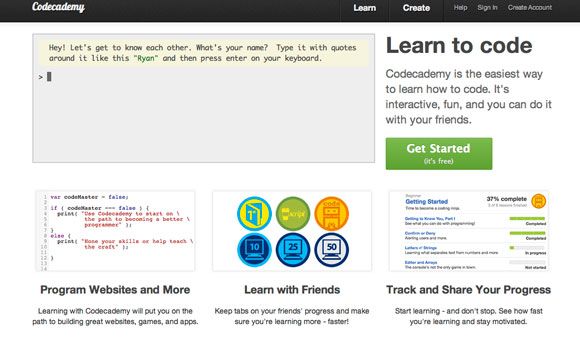
Struggling with web design? A good way to learn tactics and strategies to help yourself out is to simply google it! There are tons of great websites that can help you get on track to the best web designing of your life!
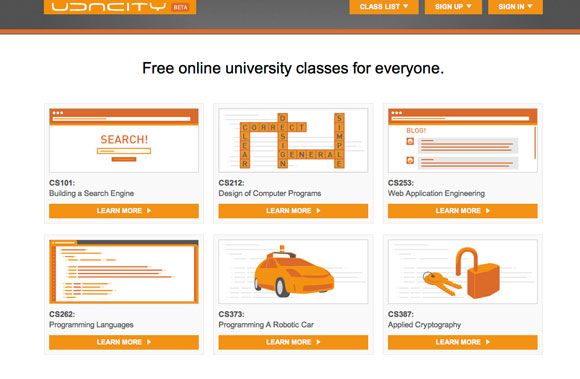
I really liked the clean layout of Udacity because it was very simple and easy to use and navigate. The cool thing about Udacity is that it is led by expert professors from Stanford and the University of Virginia, so you know you’re getting great information.
Udacity Homepage
Switching to Online
As we all transition our classes online due to the corona outbreak and shut down of campuses all across the nation. This made me think about how things would be if this class was taught completely online. While online classes may be convenient during this time, I personally prefer in person lectures for classes like CA 260.
Reasons why this class is better in person:
This class is mostly based off of learning the skills of HTML code, and that is best explained with someone right there to answer any questions and to make sure you are doing it correctly.
It also helps to have students next to you to bounce ideas off of, and to boost creativity.
I really enjoyed all that I learned while taking my classes in person at South, and I feel like we aren’t getting the same education as we would be getting if we were in class right now.
Is your web page accessible to all kinds of people? If it isn’t, you might want to take a step back and see what improvements can be made because it is important to include all of your audiences equally. In this blog I will discuss some things I am going to implement in my web page that I think are useful for you all to know, and also go over tips to make your website more accessible.
Above is a graphic of a computer and the impairments that may surround making a website accessible.
Ways I plan on making my website more accessible:
Typically people think about web users with disabilities when the topic of accessibility comes up. Making sure that everyone can use your website is one of the most important aspects of web design.
Mobility:
One easy way to increase your accessibility that I plan on using is to make your website navigable by the tab bar. For people that have reduced motor skills this is vital to being able to use a website. An old person with Parkinsons might not be able to properly operate a mouse because of their hand tremors, but if the tab key can be used to navigate the website, this makes it easier for that person to use it.
Vision:
People with vision disabilities need your website to be accessible and able to cooperate with screen readers and magnifiers so that they can view your page to their best ability. if you were interested in seeing how people with low vision read webpages here is a link to show you what it is like: https://webaim.org/simulations/lowvision
Pictured above is an example of a website magnifier.
Hearing:
if your website contains any video or audio make sure it has some sort of closed captioning or script to be able to show people with hearing disabilities what is being said.
Cognitive:
Cognitive impairments are more difficult to be able to satisfy because there are so many different types. as long as your website is easy to understand and use you should be in the clear! below is a link to it simulator for distractibility so others can see how difficult it is for someone with a cognitive impairment to focus: https://webaim.org/simulations/distractability
We have talked about ways to make your website accessible to everyone, but there are a lot more different types of excess abilities that don’t involve disability such as whether or not your website is compatible with different devices. it is important that your website is able to be viewed on multiple devices and platforms.
Thank you for reading about making your website more accessible, I hope this helps!
Now that you have created your own website based off of the steps from last week’s blog, I’m sure you are asking “what is the next step?” Well since you have taken the measures to create a website, now the empty skeleton of your themed site sits awaiting your creative mind to take over. This part of the web design process can be really enjoyable if you let your creative juices flow! I am going to provide you all with the 5 most useful tips when designing your website so it fits the brand you want to portray to the public.
The first thing your viewers see when they click on your website is your homepage. According to an instructional video on homepage design “the homepage is the window to your brand and to your content so it really needs to pop.” This video: https://youtu.be/t14MwuWH_ts speaks on the first tip we will discuss.
Tip #1: There’s no place like “Homepage”
Growing up your parents always tell you that the most important thing is to make a good first impression when meeting someone, so why wouldn’t you want your website to make a first impression when meeting your viewers? The homepage might be the single most important part of your website, and if it is hard to navigate most people will simply give up. First and foremost, your homepage should be clear in what your website’s purpose is. The video in the link provided states how the main homepage shouldn’t be too flashy or over the top, it should have key points and an easy way to get to the other pages on your website.
Tip #2: Extra! Extra! Read all “About Us”
According to an article written by Jordan Dick on https://venturi-web-design.com/planning-a-website-organizing-your-content-a-short-guide-for-beginners/ the most viewed page other than your home page is the “About” page. This page is so important because viewers come here to learn more about the creator of the site… YOU! This is where you can get really personal with your viewers and tell them your background and why you decided to create the website. On this page you should put pictures of yourself, stories, and personalize it to your heart’s content!
Tip #3: Call Me Maybe
Another vital page to include during your web design process is a contact page. This page should at least include an email address so your audience can get in touch with you. This is also where you can include links to your social media to build your brand further.
Here is an example of a good contact page:
Contact page from Atlassian that provides contact information to different sections of the company such as: Technical support, Pricing, Billing, and Licensing, and Product Advice
Atlassian does a great job of presenting their contacts so that customers know exactly who they are getting in touch with.
Tip #4: Land(ing) Ho!
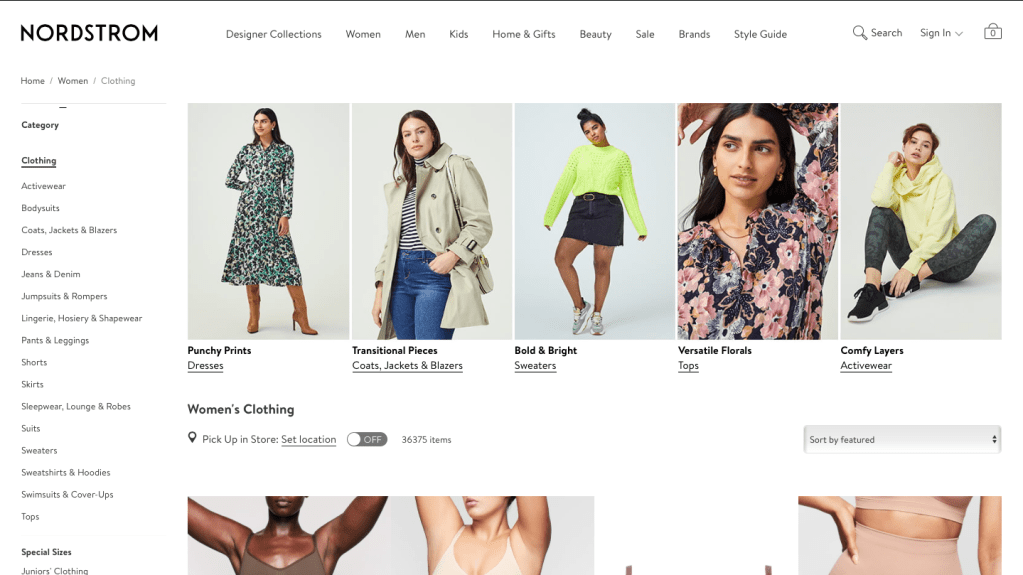
Now let’s talk about landing pages. Sometimes your audience will be directed to a certain page of your website based off of what they type into the search engine. For example if I type in “Womens Clothes Nordstrom” into Google I am immediately directed to this page:
The Women’s Clothing landing page on Nordstrom’s website
Because Nordstroms has multiple landing pages based off of their merchandise that they are selling, it makes their website easier to navigate, and overall more efficient for the customer. This also increases your chances of your website being viewed because more landing pages translates into the more entry points you have to your website.
Tip #5: The Customer Knows Best
The last tip before designing your page, is to consider who you’re designing it for. The theme and feel of your website should be based on who is viewing it and using it on a daily basis. By taking into account who your audience is, you are able to better cater to their needs. Where you guide your viewers, and how you meet all of their needs is going to be the main reason your website is successful or unsuccessful.
I hope these tips help and I cannot wait to see what you create.
Happy designing!
Works cited:
Ling, Amy, et al. “Organizing Website Content – A Step By Step Guide For Beginners.” Venturi Web Design, venturi-web-design.com/planning-a-website-organizing-your-content-a-short-guide-for-beginners/.
Have you ever thought about making your own website? I personally have always wanted to, but thought I would never have enough knowledge of technology to. In my digital writing class this week we used a website called Weebly to create our own website.
Not going to lie I was definitely intimidated at first, but www.weebly.com made it so easy and simple to go through the process. The website takes you step by step and holds your hand through creating a page, and adding your own personal flare. The only thing you have to do is create an account and you’re on the road to ruling the internet.
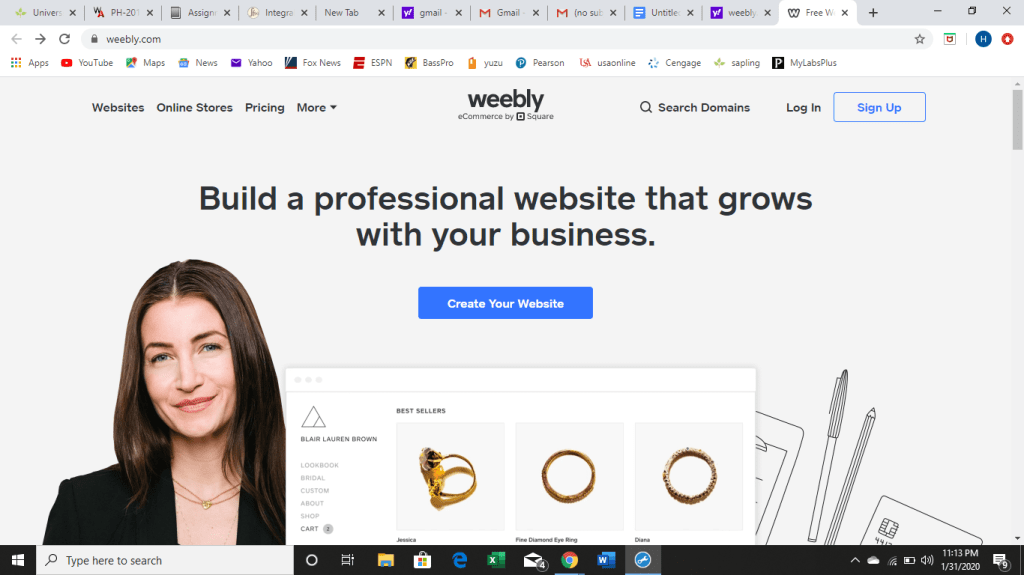
Below is a screenshot of what the website looks like when you first type it into the browser. After clicking “Create your website” it will take you through the steps below.
Pictured above is a screenshot of the Weebly homepage
After creating an account it asks you to pick a theme for your website. Weebly provides you with a variety of themes to choose one, so you can pick something that matches with your personal preferences. I picked one with a lot of images because I wanted my website to have pictures of athletes on it and a white background. I will most likely keep the lineup of the theme the same because I like how crisp and organized it looks. However, I will obviously change the pictures, font, and content to fit what I have in mind for my page.
Pictured above is the page where you pick the theme for your webpage
Next, the website will lead you to pick a domain name such as www.webkinz.com. You can come up with your own web address so when people look up your website it is easy to find. My web address is my name, www.hannahmaddux.weebly.com. Although you may have to play with a few combinations initially, once you find one that isn’t taken you select it and move on to the next step.
Now there is only one thing to do and that is to make your new page YOURS! You can decorate and edit your page to set up your website to make it exactly how you want. By changing fonts, color schemes, and inserting images, slideshows and videos you can make your page appealing to viewers.
Weebly makes it easy for new web designers by laying out what to do step by step, and clearly labeling what to do. The set up of Weebly is extremely straightforward and simple to figure out even for someone who has no prior knowledge of how to create a website. For more information on how to work Weebly and to build and grow your website, I would suggest watching this informational video as it has a lot of useful tips. https://youtu.be/VlURuZWSoXw
Have you ever thought about writing a blog whether it’s on a certain topic or just finding an outlet for your voice? When it comes to blogging and online posts there are certain tricks of the trade that will make your site more appealing to viewers. According to this article by Writers Digest, https://www.writersdigest.com/online-editor/the-12-dos-and-donts-of-writing-a-blog, there are Do’s and Don’ts to writing a blog.
First let’s tackle the Do’s…
When starting a blog you should choose a focus topic to base the content of your posts off of. While this blog will primarily be on web design, many bloggers worldwide choose topics such as fashion, food, traveling, etc. The categories and creativity are endless!
The next step is to find your voice! Every blogger has their own individual personality and it is pertinent to the success of your blog that you let yours shine through!
Third, including links to other articles and blogs makes the experience better for your readers, increases how many clicks you get on your website, and lastly helps increase your exposure on the search engine page.
Include images. Everyone likes to look at pictures. It is not only easier on the eyes than a large wall of text, but it entices readers and makes your page more aesthetically pleasing.
Put yourself out there! Whether it’s responding and commenting on other blog posts or getting exposure on social media sites such as Twitter and Instagram, publicity is key when it comes to having a successful and well-known blog.
How to apply the Do’s
If I were making a blog that coincides with my career path, I would most likely choose sports as my focus. Now that the first step is complete it is time to start writing. Finding your voice tends to become easier as you get more comfortable with the blogging process. It can be as simple as adding humor to your posts or giving your strong opinion on the subject of your blog. Next, including links is an easy way to provide your readers with even more information on the topic. So in the example of the sports blog, if I was writing a blog on a player being traded to another team, I might include a link to an ESPN article on that specific player’s stats or even a link to the biography of that player such as this one, https://www.espn.com/nba/player/_/id/6450/kawhi-leonard, so my readers can learn even more about him/her. Another good thing to do would be to add a picture of this player, so the reader knows what the person looks like and is, therefore, more knowledgeable. If this theoretical player being traded was say… Kawhi Leonard, I would insert a picture like this:
Picture of Kawhi Leonard while playing for the Los Angeles Clippers
Visual aids are always helpful while constructing a blog. Lastly, in order to put myself out there, I would connect with other sport pages on either twitter, Instagram, Facebook, or any other social media platforms and ask them to give my blog a shout out so that I could get viewers from people that are interested enough to follow those sports pages in the first place.
Now let’s talk about the Don’ts…
Don’t set unrealistic goals or posting schedules that you can’t meet, and then leave your viewers waiting on new content…
Don’t limit your word count. Take as many or as few words as you need in order to get your point across.The most important part is to get all the information in the post.
Don’t make grammar mistakes. A few typos here and there is understandable as we are all human, but the more you can avoid mistakes the more credibility you have, and the more you are respected by the reader.
Try not to be negative. You are more likely to be well received by the reader if what you wrote is uplifting, positive, inspiring or funny.
Don’t write long paragraphs. When readers open a tab and it is a giant wall of text and are more likely to click off and not read. Whereas readers prefer short paragraphs that are more enjoyable to read.
Avoid trying new things. It is best to stay in your category and not branch out too far. If your viewers are enjoying the content you’re producing then as my grandmother says “don’t fix it if it ain’t broke!”
How to avoid the Don’ts:
In our example of the sports blog, I would choose a posting schedule that is obtainable for me such as maybe 2 to 3 times a week. Another good thing to do is to set days of the week such as Tuesday, Thursday or Monday, Wednesday, Friday to post. Next, write until you are content with what you have produced. If you have images and your blog is formatted well people will read it even if it is long. This also has to do with the don’t of long paragraphs. Try to be as concise as possible with your words, but if it’s programmed well people will enjoy it more. The next don’t regarding grammar is pretty self-explanatory. A good way to ensure this doesn’t happen is to have a few people read it over and check it. Next, try to be as positive as possible, in the hypothetical player trade from earlier, in my blog I might focus on how this player’s abilities will be a good thing for the new team he is being traded to rather than how the old team is going to be awful after the player leaves. Lastly, since I chose the topic of sports, it is best to stick with it, because if I decide to do a blog on food one day and sports the next, my viewers will not only be confused, but I will most likely lose some of them too.
How I will implement these tips into my weekly blogs:
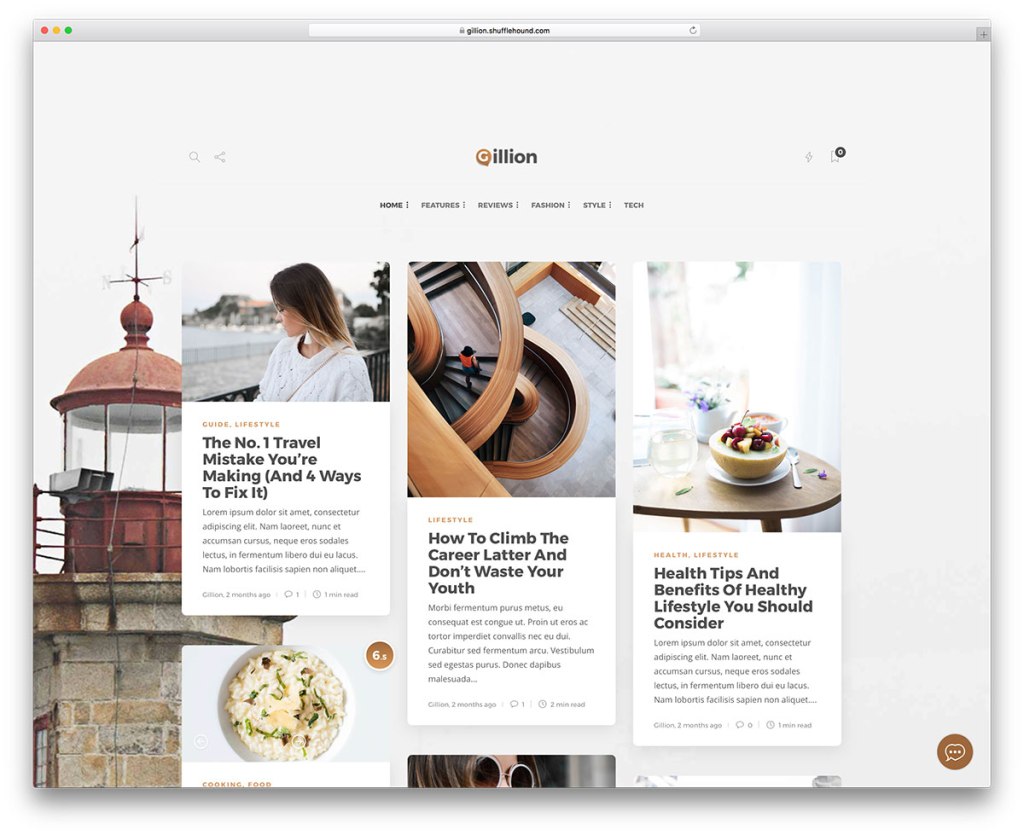
In order to make my blog the best it can be to keep my readers engaged, I will make sure my page is organized and easy to navigate. An example of a well developed, organized blog is pictured below. As you will notice, there are drop down tabs and other easy to use tools to navigate the website.
Blog example
If it takes more than two clicks to get information, many viewers lose interest and exit your website. Making your page more accessible to viewers makes it more desirable to those reading it. I will also keep my posts upbeat, informational and relevant to the interests of my viewers.
Hello everyone! Welcome to my first BLOG! My name is Hannah Maddux, I am a freshman at The University of South Alabama. My passion has always been watching and playing sports. I am a student athlete on the volleyball team here at USA, and I hope to obtain a degree in Communications and Media Broadcasting and continue my involvement in sports by being a sports reporter.
My volleyball picture. 2019 Volleyball Studio Shoot. (Scott Donaldson | USA Athletics Photographer)
Many people in the field of my desired profession have blogs so that they can keep readers updated on current stories and occurrences in the sporting world. A blog is the perfect tool for reporters to post their opinions on events happening such as players being traded, injured, or any information that could be important to readers who are also interested in this topic. I read several sports blogs such as https://bleacherreport.com/, and https://thelandryhat.com/ to stay updated on everything that is going on. Bleacher Report specifically does a great job on providing its readers with a vast variety of information on practically every sport both professional and collegiate. They also have an advanced social media team that markets their blog well and gains readers by posting graphics and videos such as memes or highlight reels on Instagram and Twitter to get people to check out their website.
A creative graphic from a Bleacher Report post on top players in the NBA
I personally enjoy The Landry Hat because being from Texas I am a devoted Dallas Cowboys fan, and this blog successfully puts out every bit of information possible about the Dallas cowboys to keep Dallas fans in the know. Especially after the recent replacement of the Cowboy’s Head Coach Jason Garrett, this blog has been on top of updating every time new information was shared with the public up until the empty head coaching spot was filled by Mike McCarthy. I believe the purpose of a blog is to share things you are passionate about and put your own opinions or personal flare on the information you are posting online. Whereas news articles tend to be professional, blogs are more personalized, and a great way for the writer to engage readers on a topic they care about. So, thank you for tuning in to my first blog post and I am looking forward to future blogging! 🙂




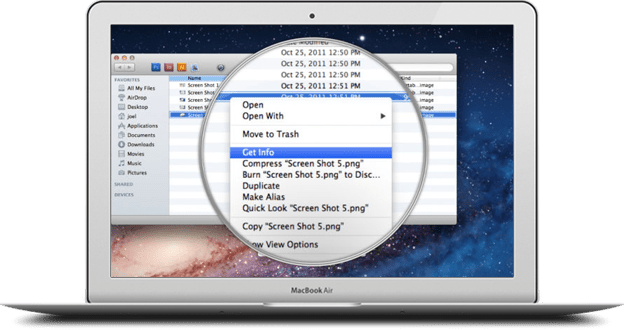 Pictured above is an example of a website magnifier.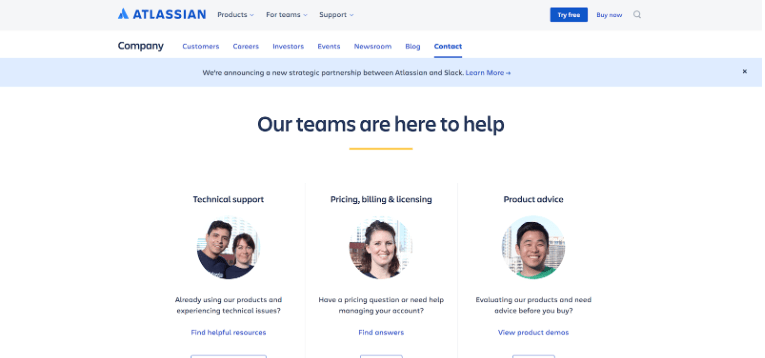




 Hannah's Blog